Delay, taken beyond where most delays stop.

Every clean, controlled, standard-issue delay sound — plus some new tricks: tape saturation and tape wear, oscillating tap density, tremolo, chorus, and stereo effects, with ranges that go way beyond the limits of most other delays.

Mac & Windows · VST3 & AU · No DRM · No subscriptions · No dongles · No iLok · Perpetual license

Warp Delay plugin interface

Core Controls

Warp Delay's core engine — visualizer, Length, and Warp

Traditional and Extreme

Everything from clean slap-back and rhythmic multi-tap patterns to tape-saturated chaos at the far end of every knob — taps warped and pulled toward a single point in time, like light bending near a black hole. Warp Delay doesn't clamp the extremes off to keep you safe: turn a parameter all the way and it goes all the way.

Core Features

Effects

Randomize, on Purpose

The Randomize button isn't a novelty reset. Every parameter it touches is individually selectable, so you decide what's fair game and what stays locked in place. Randomize only Warp and density while your tone controls stay put, and you'll land on tap patterns you'd never have dialed in by hand. Step back through your history with the arrow controls if a happy accident is worth keeping.

The Warp

Warp control — tap distribution warping toward a singularity

Stretches and breaks the delay tap distribution — squish taps so close they collapse to a singularity, or pull them further apart. The plugin's namesake control and its visual centerpiece: automate it from your host and real pitch-shift artifacts start showing up as taps collapse, movement a static knob position can't give you.

Under the Hood

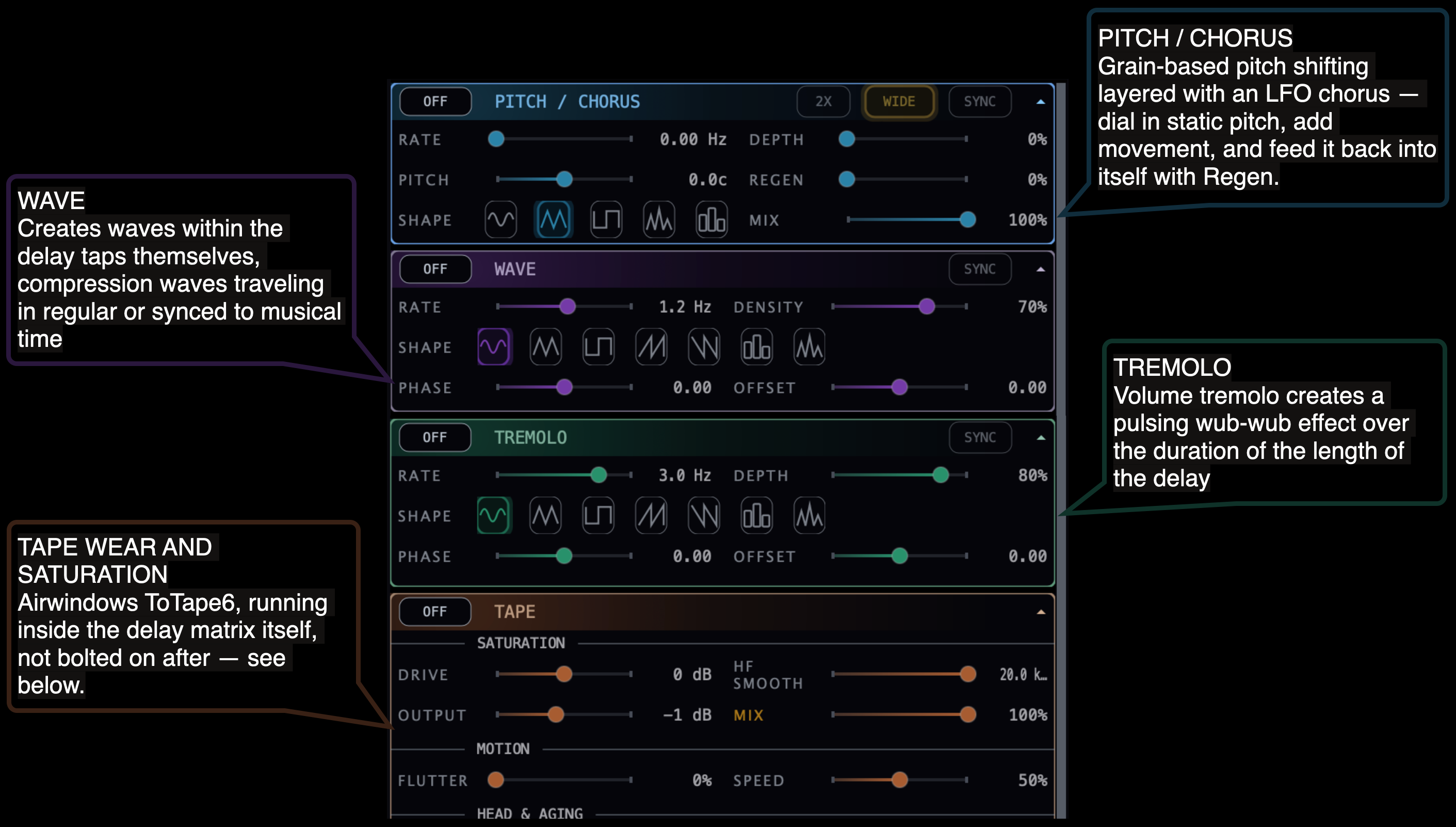
Four effect sections, each its own accordion, stacked after the core delay engine.

Annotated Warp Delay plugin screenshot showing Pitch/Chorus, Wave, Tremolo, and Tape sections

ToTape6, Integrated

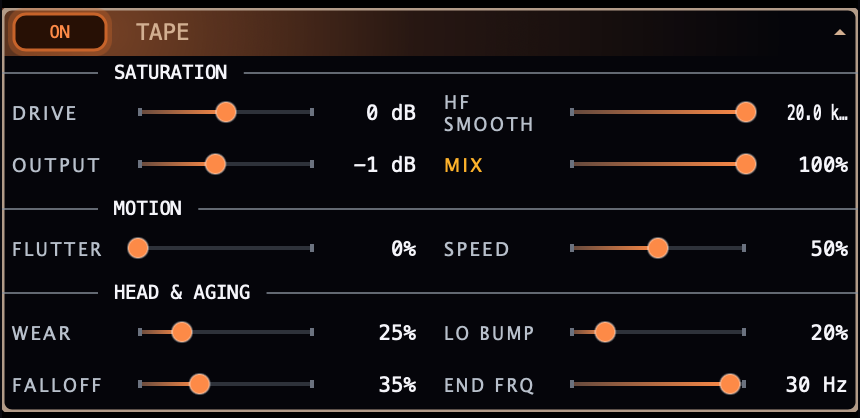
Tape panel — Saturation, Motion, Head and Aging controls

The tape stage traces back to Airwindows — ToTape6 (Patreon-funded, MIT-licensed). It isn't a straight port: this version runs inside the delay matrix itself, at the record head, so saturation and tape wear compound with every feedback pass instead of coloring the signal once on the way through, like a series effect would. MIT License, Airwindows.

Warp Delay Audio Examples

Slide the crossfader to hear the "wet" effect.

Try this: ambient pillowy echoes, heavily lowpassed with consistent delay tap timings.

Use as a thickener: Engage Chorus and Wide on a simple synth sound and each delay tap essentially becomes a new oscillator, adding up to 64 additional detuned voices, thickening the sound, and giving new life to ordinary sounds. Add Tape drive for more harmonic saturation.

Try this: push the drums through a single low-latency (1ms) delay tap, and use Tape drive and head bump to saturate your drums. Alternatively, use tape wear to degrade your sound.

Try this: use the Wave effect to create ripples in the delay line. Use Tremolo to create volume pulses.

Beyond the Basics

Independent control of IN and OUT tap density

How it's different

Most delay plugins give you one or two taps and a feedback knob. Warp Delay runs a full multi-tap matrix with independent In/Out density curves, tape saturation built into the feedback loop itself — not chained after — and Tremolo, Wave, and Pitch/Chorus stacked inside the same signal path instead of three separate plugins.

Tape saturation and wear implemented inside the delay matrix

Why it's unique

Tape saturation and tape wear live inside the delay's own feedback path. Warp Delay's tape compounds with every repeat instead of coloring the output once, and its warp curve gives you a physical, visual handle on the plugin's most experimental corner. Further refinements include tape head bump, high-frequency rolloff, and variable speed and intensity tape flutter.

Use the WARP to stretch and pull the delay taps

Weird uses

Automate Warp Delay's warp curve from your host instead of leaving it static — the pitch-shift artifacts it throws off as taps collapse are a modulation source most plugins can't fake. Run a drum hit through with In/Out density maxed and Decay curve steep for a granular-adjacent texture. Automate density and Warp in opposite directions and the whole tap pattern turns inside out.

Get Warp Delay

Mac & Windows · VST3 & AU · No DRM · No subscriptions · No dongles · No iLok · Perpetual license

Already purchased? Download the installer, then activate with the license code from your purchase email.

Download for Mac Download for Windows